Solar margins live and die on material. A pallet of panels in the wrong godown, a missing box of MC4 connectors that halts a crew, or a purchase bill you forgot to claim Input Tax Credit on — each quietly eats your profit. evSuryam's inventory module tracks every component across every location, warns you before you run out, and turns each vendor bill into three correct accounting entries at once.
Overview
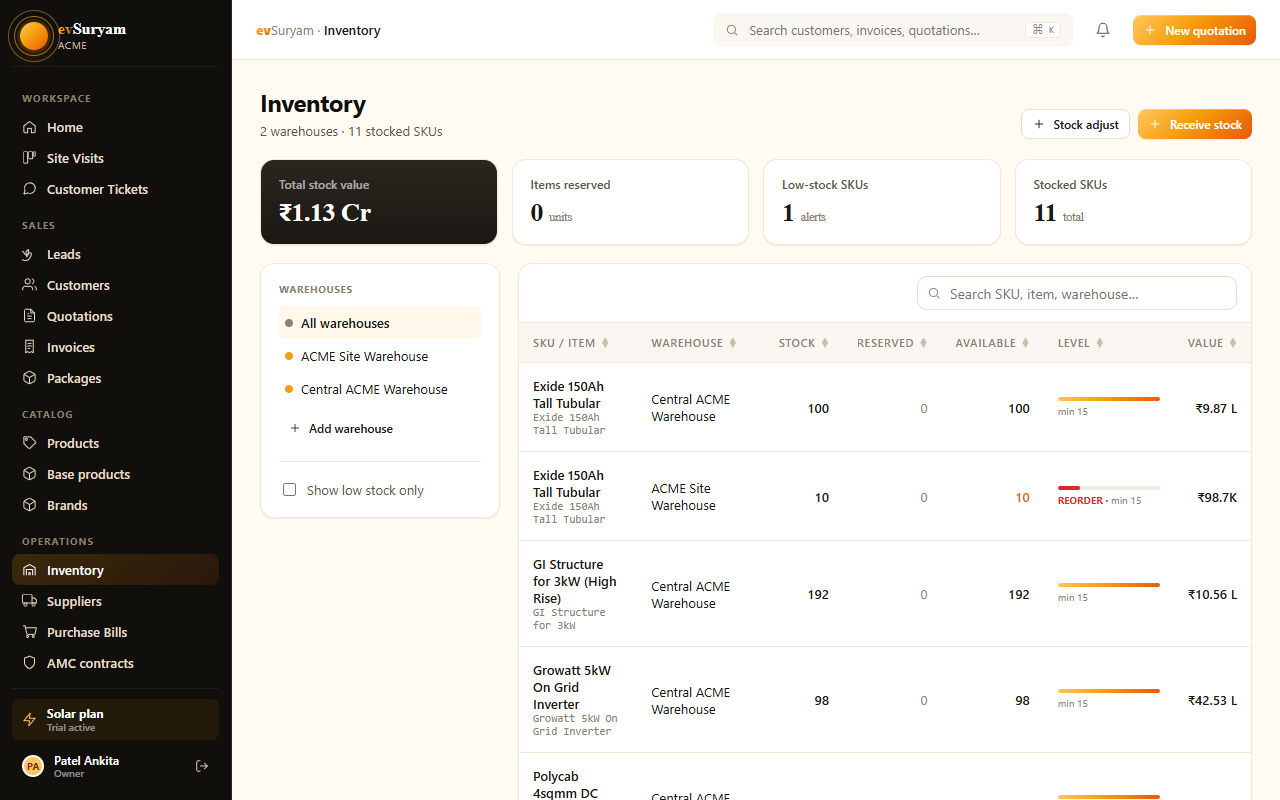
Open Inventory from the sidebar. You'll see your full item list with on-hand quantity per warehouse, current valuation, and a low-stock flag on anything below its threshold. Purchases sits alongside it — that's where vendor bills are recorded. Together they keep your physical stock, your GST claims, and your payables in sync without double entry.
public/images/docs/inventory-purchases.pngEnter goods once, see them everywhereA single purchase bill raises your stock, books the Input Tax Credit, and credits the vendor in your Accounts Payable ledger. You stop maintaining a separate stock register, a GST sheet, and a payment diary — they're the same record now.
Multi-warehouse stock
Most vendors keep a Main Godown for bulk stock and one or more branch stores near active sites. evSuryam tracks quantity per warehouse so you always know where a panel is, not just that you own it.
- Create each location under Inventory → Warehouses — for example Main Godown and Branch — Pune.
- Every stock figure is shown per warehouse, so a crew dispatcher can see the branch is out of DC cable while the main godown is full.
- Purchases and transfers always specify a destination warehouse, so the location stays accurate automatically.
Stock transfers
When you move panels from the main godown to a branch ahead of an installation, record it as a transfer so both locations stay correct.
- Go to Inventory → Transfers and click New transfer.
- Choose the source warehouse (e.g. Main Godown) and the destination (e.g. Branch — Pune).
- Add the items and quantities — say 20 panels and 2 inverters.
- Save. evSuryam decrements the source and increments the destination. The total stock you own is unchanged; only its location moved.
Transfers don't touch valuationMoving stock between your own godowns is not a sale or a purchase, so it has no GST and no effect on total inventory value. It only changes where the value sits.
Low-stock threshold alerts
The items that stop a job are rarely the expensive ones — they're the consumables. A crew can't terminate a string without MC4 connectors, and can't run a roof without DC cable. Set a minimum threshold on these and evSuryam warns you before you hit zero.
- Open the item (for example MC4 connector pair or DC cable 4 sqmm).
- Set its low-stock threshold — the quantity at which you want to be alerted.
- When on-hand falls below that level, the item is flagged in the inventory list and an alert is raised so you can raise a purchase order in time.
Set thresholds on consumables firstDon't only watch panels and inverters. The cheapest line items — connectors, cable, lugs, earthing strip — are the ones that idle a crew on the roof when they run out mid-job. Put thresholds on those before anything else.
Real-time stock valuation
evSuryam values your inventory using the average purchase price. Each time you log a purchase bill, the system blends the new cost into the running average for that item, so the valuation reflects what you actually paid across deliveries — not just the latest invoice.
- Buy 30 panels at ₹9,000, then 30 more at ₹9,400 — the average cost becomes ₹9,200, and that's the rate used to value your remaining stock.
- The total inventory value updates in real time as you receive goods and consume them into projects.
- This gives you an honest cost basis for margin reporting and for the value of stock sitting idle in each godown.
Logging a purchase bill
This is the entry that ties everything together. When a vendor delivers material with a tax invoice, record it once and let evSuryam fan it out into three places.
- Go to Purchases → New purchase bill.
- Select the vendor and enter their bill number and date.
- Add each line item, quantity, and rate, and choose the destination warehouse the goods are landing in.
- Enter the GST charged on the bill (CGST+SGST for an in-state vendor, IGST for inter-state).
- Save the bill.
On save, evSuryam automatically does three things:
| Automatic effect | What it means |
|---|---|
| Stock up | The on-hand quantity of each item rises in the chosen warehouse, and the average purchase price is recalculated. |
| Input Tax Credit | The GST on the bill is recorded as ITC you can offset against the GST you collect on sales — see GST & compliance. |
| Accounts Payable | The vendor is credited in your payables ledger, so you always know exactly who you owe and how much. |
Imported inverters are differentWhen you import an inverter, GST often applies under the reverse-charge mechanism — you pay the tax, not the overseas supplier. That changes how ITC is claimed on the bill. Read reverse charge on imported inverters before recording an import.
Trackable item categories
A solar BOM has a handful of natural groups. Organising your catalog into these categories keeps inventory readable and reporting meaningful.
| Category | Typical items | Why track it |
|---|---|---|
| Panels | Mono PERC / TOPCon modules by wattage (e.g. 545 Wp, 580 Wp). | Highest-value line; valuation and per-watt costing depend on accurate counts. |
| Inverters | String inverters by kW, hybrid inverters, micro-inverters. | Serial-tracked, warranty-sensitive, and often imported (watch reverse charge). |
| Mounting | Rails, clamps, hooks, ballast / foundation hardware, structure GI. | Consumed per kW; running short halts civil work on site. |
| BOS (balance of system) | MC4 connectors, DC & AC cable, DCDB/ACDB, earthing kit, lightning arrestor, conduit. | Cheap but job-critical — exactly the items to put low-stock thresholds on. |
Linking stock to projects
Inventory isn't just a warehouse count — it's tied to the work. When a project moves through the installation pipeline, the material it consumes can be drawn down from stock.
- A Won quote brings its bill of materials onto the project, giving you the planned material list.
- As the crew installs, the consumed items are logged against the project and deducted from the warehouse they were issued from.
- This gives you a real per-project material cost to compare against the quoted price — your true margin, job by job.
- It also keeps on-hand figures honest, so low-stock alerts fire on what's genuinely left after committed jobs.
Close the loop on marginQuote price minus actual consumed-stock cost minus labour is the number that tells you whether a job made money. Because purchases, valuation, and project consumption all live in evSuryam, that figure builds itself instead of living in a spreadsheet you never update.